Find a plan for Apple Watch For Your Kids (Family Setup). Explore local carriers, activation requirements and model restrictions for a child’s Watch without their own iPhone.
55 family-watch listings25 countries and regionsChecked
55 family-watch listings; 33 other plan checks, plus regional guidance
Search stays in your browser. No location access or account needed.
We research the published answers so you do not have to start from scratch. Open a carrier for its plan, price, account requirements and setup instructions. Each family-watch listing says whether it is listed by Apple or confirmed in the provider’s own documentation. Other plan checks explain unsupported, phone-linked or unverified options without counting them as family-watch listings. OkayTu app availability is separate. How we verify availability.
Use the dropdown for your country and the search box for a carrier name. Try a different spelling or reset the filters. A missing result does not prove that all Apple Watch use is unavailable. Check the specific family-watch setup before buying.
Telstra Watch Plan requires an eligible Telstra parent phone plan. BetterRoaming can be used with another carrier’s unlocked iPhone. Both provide a separate Watch number; their prices and account requirements differ.
BetterRoamingListed by AppleView plan and setup detailsClose carrier details
BetterRoaming: what we found
Plan
Apple Watch For Your Kids: a standalone Watch eSIM with its own phone number.
Set up the Watch for a family member, then choose your country and monthly or yearly plan. Create or sign in to a BetterRoaming account and enter the Watch EID from Watch > General > About.
Accept the add-plan notification on the managing iPhone. If it does not arrive, open Watch > Set Up Cellular > Install Data Plan. The installed network is named 1GLOBAL.
Applicable sales taxes included. International roaming and sending or receiving international calls and SMS are not supported.[1]
Eligible first-time users get a 7-day trial. Payment details are required and billing starts afterwards unless auto-renewal is turned off.[2]
Cancel auto-renewal in the online account. Service continues to the end of the paid period. Unused prepaid service is generally not refunded, subject to the terms and consumer rights.[1]
Apple lists a family-watch option even when your iPhone carrier does not support Family Setup. Provider-specific eligibility and any unresolved conditions are recorded in this listing.
A carrier-locked parent iPhone may need unlocking before this provider can activate the Watch plan. Check before paying.
AU$20/month for the Watch service. With the required Basic Upfront phone plan, the advertised minimum combined cost is AU$94/month, excluding Watch hardware.
Telstra’s current setup guide requires a cellular Series 6 or later, or a cellular SE, running watchOS 26.5 or later. The managing iPhone must be iPhone 11 or later. Series 4 and 5 fall outside these published requirements.[1]
First-generation SE also cannot meet Telstra’s software requirement: Apple caps it, Series 4 and Series 5 at watchOS 10.6.1. The broad SE name in a carrier guide does not make every SE generation eligible.[2]
Choose Set Up for a Family Member in the Watch app, then Set Up Cellular. Sign in with the account owner’s Telstra ID, select Telstra Watch Plan and complete checkout. For an existing family Watch, open All Watches, select it, then Cellular.
2GB/month, shared with eligible Upfront services on the same account, plus unlimited standard Australian calls and texts. No international roaming or satellite messaging.[1]
After the included data is used, speeds reduce to 1.5Mbps or below without excess-data charges. The Critical Information Summary also includes 30 international call minutes and standard international SMS/MMS each month, for use from Australia.[2]
One-month minimum term. No early plan cancellation fee, but remaining device repayments become payable. Cancellation does not refund the unused part of the month.
Everyday MobileNot compatible: phone-linked planView findings and alternativesClose carrier details
Everyday Mobile: what we found
The published Watch add-on shares the phone’s number. Everyday Mobile’s Smart Watch eSIM extends an existing mobile plan to the Watch, sharing its number and inclusions. Calls to that number ring both devices. This is companion service, not documented activation for a child with a separate Apple Account and no iPhone.
Reviewed . This finding applies to the documented service, not every possible future offer.
MoreNot compatible: phone-linked planView findings and alternativesClose carrier details
More: what we found
Shared Number is a phone-linked Watch service. More’s Shared Number requires an eligible More 5G SIM-only mobile plan. The Watch shares the phone number and uses the phone plan’s data. Being able to leave the phone at home does not establish family-managed Apple Watch support.
Reviewed . This finding applies to the documented service, not every possible future offer.
OptusNot compatible: phone-linked planView findings and alternativesClose carrier details
Optus: what we found
Number Share shares one number with the paired phone. Optus documents Number Share for a compatible phone and Watch using one mobile number. Its activation guide connects the Watch to the existing phone service. The reviewed offer is not a documented separate-number Family Setup plan.
Reviewed . This finding applies to the documented service, not every possible future offer.
TangerineNot compatible: phone-linked planView findings and alternativesClose carrier details
Tangerine: what we found
Shared Number uses the existing mobile number. Tangerine’s Shared Number requires an eligible Tangerine 5G SIM-only mobile plan. It shares the phone number and plan allowances with the Watch. The reviewed instructions do not establish a family-managed Watch line for a child without an iPhone.
Reviewed . This finding applies to the documented service, not every possible future offer.
Batelco publishes family-member activation through its account login. Apple also lists Zain, including a cross-carrier family-watch option, but Zain’s child-line tariff and account requirements remain unverified.
BatelcoListed by AppleView plan and setup detailsClose carrier details
Batelco: what we found
Plan
Batelco supports the Set Up for a Family Member activation route. Its wearable service is for postpaid customers.
Published wearable tiers are BHD4.40/month with 4GB and 200 local minutes, or BHD1.10/month sharing a phone plan. Both include VAT. The page does not identify which tier Family Setup offers.
Enable Bluetooth and mobile data on the iPhone. In the Watch app, choose Set Up for a Family Member, then sign in with the eService account registered to the account holder’s CPR.
Select the wearable plan offered for the family Watch and tap Submit to activate it.
Apple lists a family-watch option even when your iPhone carrier does not support Family Setup. Provider-specific eligibility and any unresolved conditions are recorded in this listing.
Plan details and conditions
Which of the published wearable tiers is available for a child’s separate number, any activation fee and the final cancellation bill.
ZainListed by AppleView plan and setup detailsClose carrier details
Zain: what we found
Adult account
Apple lists Zain Bahrain as an option even when the managing iPhone’s provider does not support Apple Watch For Your Kids (Family Setup). Zain’s exact account eligibility is not verified.
Apple’s family setup starts in the iPhone Watch app: All Watches, Add Watch, then Set Up for a Family Member. The adult and child need separate Apple Accounts in the same Family Sharing group.
Apple lists a family-watch option even when your iPhone carrier does not support Family Setup. Provider-specific eligibility and any unresolved conditions are recorded in this listing.
Plan details and conditions
Zain’s separate family-watch tariff, allowances, account conditions and carrier activation procedure remain unverified. Its public Watch hardware instalments are not the connectivity price.
Bell, Rogers, SaskTel and TELUS list standalone Watch services. These differ from number-sharing add-ons. Bell publishes a route for parents using another phone carrier; other providers have their own parent-account conditions.
BellListed by AppleView plan and setup detailsClose carrier details
Bell: what we found
Plan
Smartwatch Standalone provides the child’s own number. Do not choose NumberShare, which is for a Watch sharing the adult’s phone service.
Your iPhone can stay with another provider. If you are new to Bell, a store or representative sets up the standalone plan before you finish Watch activation.
Choose Set Up for a Family Member, then complete cellular setup. Bell requires Wi-Fi Calling and an emergency address to download the eSIM and finish standalone activation.
5GB full-speed data, then unlimited non-shareable data up to 512kbps. Includes calls and texts to Canadian numbers while in Canada; texts to US/international numbers are excluded. No cellular roaming outside Canada.
Eligible bring-your-own watches are supported. A Watch handed down from a Bell purchase must have no remaining SmartPay balance. Bell prepaid accounts are excluded.
Includes 1GB, unlimited nationwide calling and texting. Published data overage is C$15/100MB through 800MB, then C$0.15/MB. Watch cellular use is limited to Canada’s Bell VoLTE coverage.
A Bell-network offering, not an additional mobile network.
Plan details and conditions
The separate Unlimited Share footnote does not identify its applicable plan. Whether its parent-plan requirement and data allowance apply to standalone service remains unresolved.
CA$15/month plus taxes. Financing a smartwatch and adding its plan to an Ultimate phone plan qualifies for a CA$15 monthly service credit for 24 months. Hardware payments remain separate; standard service fees apply afterwards.
Choose Set Up for a Family Member, then Cellular and Set Up Cellular. Sign in to MyRogers, select the plan, validate the 911 address and review the transaction.
Published device-purchase terms add CA$40 for specialist-assisted setup or CA$25 shipping on self-serve online orders. Financed hardware balances become due if the agreement ends early.
This carrier does not support UMTS (3G) for Apple Watch. Check its Watch coverage where your child will use it.
Apple lists carrier-supported satellite features for Ultra 4, Series 12 GPS + Cellular and SE 3 GPS + Cellular. This does not mean every satellite feature is included with every plan.
Plan details and conditions
The reviewed plan and Family Setup pages do not clearly state whether a new standalone activation requires an adult Rogers phone line.
Activate while in Canada using family-member setup and the Smart Data Standalone 1 plan. Without mySASKTEL access, the account must be pre-authorised before activation.[1]
In the Watch app, open Cellular, Set Up Cellular, Start, then sign in to mySASKTEL. Buy Smart Data Standalone 1, agree to the terms and wait for the activation confirmation before tapping Done.[2]
The family guide requires iPhone XS/XR or later with iOS 18.2 or later, an updated cellular Watch, and carrier settings SaskTel 61.1 or later on iPhone and 31.1 or later on Watch. Newer Watch models may require newer iPhone software.
Includes 1GB full-speed Canada-wide data, then unlimited data up to 512kbps. Calls from Canada to Canadian and US numbers, and text/picture messages within Canada, are unlimited. Cellular service stops outside Canada.
TELUS’ general smartwatch FAQ requires an active TELUS Mobility phone plan, but explains this using number-sharing. It does not separately establish whether a Family Setup parent can use another carrier.
Use the adult’s iPhone to add the child’s Apple Account to Family Sharing, pair the cellular Watch for that family member and activate the standalone plan.
You can bring an eligible Watch, buy outright or finance hardware over 24 months with TELUS Easy Payment. Financing is separate from the monthly Watch service.
Freedom MobileNot compatible: phone-linked planView findings and alternativesClose carrier details
Freedom Mobile: what we found
The documented plan shares the Freedom phone’s number. Freedom requires an existing postpaid customer with a compatible iPhone. Although the Watch has a number for billing and connectivity, calls and messages use the primary phone number. That billing number is not evidence of a separate child line.
Reviewed . This finding applies to the documented service, not every possible future offer.
VideotronNot compatible with Family SetupView findings and alternativesClose carrier details
Videotron: what we found
Videotron explicitly excludes cellular setup in Family mode. Videotron’s guide says cellular activation is not supported for a family member’s Watch. It includes noncellular family setup instructions, but tells the parent to skip cellular activation. Those instructions do not make its Same Plan, Same Number service a family-watch plan.
Reviewed . This finding applies to the documented service, not every possible future offer.
Virgin PlusNot compatible: phone-linked planView findings and alternativesClose carrier details
Virgin Plus: what we found
The published Apple Watch plan uses NumberShare. Virgin Plus documents a NumberShare plan linked to an eligible postpaid phone plan with data. Using the Watch away from that phone is supported, but the reviewed guide does not document Family Setup or a separate child’s number.
Reviewed . This finding applies to the documented service, not every possible future offer.
Direct research found Apple-specific independent-number instructions at China Unicom, but current new family activation remains unverified. China Mobile’s reviewed agreement is phone-linked. China Telecom’s Guangdong notice says independent wearable activation has not resumed there. Apple’s regional documents also conflict. The cards distinguish these findings rather than assuming the whole market is unsupported.
China MobileNot compatible: phone-linked planView findingsClose carrier details
China Mobile: what we found
The reviewed service shares the phone number, not a separate child number. China Mobile’s September 2026 one-number, two-terminal agreement says the Watch’s auxiliary number is not publicly visible and cannot be used as an independent number. Calls use the primary phone number. The service requires mainland-China hardware and an eligible China Mobile line registered with an 18-digit resident identity card. This reviewed plan does not provide a separate family-managed Watch line.
Reviewed . This finding applies to the documented service, not every possible future offer.
China TelecomNot compatible: phone-linked planView findingsClose carrier details
China Telecom: what we found
Guangdong’s notice says only selected phone-linked Watch services have resumed. A notice dated 28 February 2026 on China Telecom’s Guangdong website says wearable eSIM has resumed only for selected Apple and Huawei models using one-number, two-terminal service. Independent wearable eSIM has not resumed, and no restart date is stated. This is evidence about that published Guangdong offer, not a nationwide ban or proof that every mainland province has the same activation rules.
Reviewed . This finding applies to the documented service, not every possible future offer.
China UnicomFamily Setup unconfirmedView findingsClose carrier details
China Unicom: what we found
Apple-specific independent-number instructions exist; new family activation remains unverified. Unicom’s public eSIM portal includes Apple Watch independent-number instructions requiring different Apple Accounts in the same family group, then plan selection and identity verification through the Watch app. This is more specific than generic wearable eSIM, but account and regional eligibility checks leave current Apple Watch For Your Kids (Family Setup) signup availability unverified. Separately, Unicom’s September 2026 rules block new eSIM activation on Series 3, 4, 5 and 6 and the original SE. Existing installed profiles may continue; rewriting a profile requires a fresh device-security check.
Reviewed . This finding applies to the documented service, not every possible future offer.
Telia confirms children’s Apple Watch setup in Finland. Its instructions require iOS 26.2 and watchOS 26.2 or later. Telia consumer customers activate in the Watch app; other-carrier and business-line customers use Telia support or a shop.
BetterRoaming offers monthly and annual family-watch plans in France. Its published exclusions include Series 11 and 12, Ultra 3 and 4, and SE 3, so a newer Watch is not automatically eligible.
BetterRoamingListed by AppleModel limits: Not available for Apple Watch Series 11, Series 12, Ultra 3, Ultra 4 or SE 3 in this country.View plan and setup detailsClose carrier details
BetterRoaming: what we found
Plan
Apple Watch For Your Kids: a standalone Watch eSIM with its own phone number.
Set up the Watch for a family member, then choose your country and monthly or yearly plan. Create or sign in to a BetterRoaming account and enter the Watch EID from Watch > General > About.
Accept the add-plan notification on the managing iPhone. If it does not arrive, open Watch > Set Up Cellular > Install Data Plan. The installed network is named 1GLOBAL.
Applicable sales taxes included. International roaming and sending or receiving international calls and SMS are not supported.[1]
Eligible first-time users get a 7-day trial. Payment details are required and billing starts afterwards unless auto-renewal is turned off.[2]
Cancel auto-renewal in the online account. Service continues to the end of the paid period. Unused prepaid service is generally not refunded, subject to the terms and consumer rights.[1]
BetterRoaming currently excludes Apple Watch Series 11 and 12, Ultra 3 and 4, and SE 3 in this country. Confirm any change before buying one of these models.
Apple lists a family-watch option even when your iPhone carrier does not support Family Setup. Provider-specific eligibility and any unresolved conditions are recorded in this listing.
A carrier-locked parent iPhone may need unlocking before this provider can activate the Watch plan. Check before paying.
SFRFamily Setup unconfirmedView findings and alternativesClose carrier details
SFR: what we found
Family Setup is described, but an SFR activation route is unverified. SFR’s children’s Watch article describes Apple’s Family Setup feature. Its actual Montre Connectée support page documents phone-number sharing. We did not find an SFR family-watch tariff or child-without-iPhone activation procedure, so SFR is not included as a confirmed family-watch option.
Reviewed . This finding applies to the documented service, not every possible future offer.
The published family-watch options include BetterRoaming, Telekom Smart Connect and Vodafone Smart Tech M. They differ in parent-line requirements, allowances and commitment. Ordinary MultiSIM or OneNumber offers are not interchangeable with these plans.
BetterRoamingListed by AppleView plan and setup detailsClose carrier details
BetterRoaming: what we found
Plan
Apple Watch For Your Kids: a standalone Watch eSIM with its own phone number.
Set up the Watch for a family member, then choose your country and monthly or yearly plan. Create or sign in to a BetterRoaming account and enter the Watch EID from Watch > General > About.
Accept the add-plan notification on the managing iPhone. If it does not arrive, open Watch > Set Up Cellular > Install Data Plan. The installed network is named 1GLOBAL.
Applicable sales taxes included. International roaming and sending or receiving international calls and SMS are not supported.[1]
Eligible first-time users get a 7-day trial. Payment details are required and billing starts afterwards unless auto-renewal is turned off.[2]
Cancel auto-renewal in the online account. Service continues to the end of the paid period. Unused prepaid service is generally not refunded, subject to the terms and consumer rights.[1]
Apple lists a family-watch option even when your iPhone carrier does not support Family Setup. Provider-specific eligibility and any unresolved conditions are recorded in this listing.
A carrier-locked parent iPhone may need unlocking before this provider can activate the Watch plan. Check before paying.
A data plan is required. 5G depends on the Watch, local network and plan, not just a carrier listing.
Apple lists a family-watch option even when your iPhone carrier does not support Family Setup. Provider-specific eligibility and any unresolved conditions are recorded in this listing.
Plan details and conditions
The current Flex activation charge was not visible in the reviewed shop page.
In the Watch app choose Mobile Data, Set Up Mobile Data, Subscribe. Verify the account password and one-time code, select Family Sharing Setup Service and choose the Watch number. Porting a number requires a shop visit.
HK$22 contract offers require 24 or 36 months. The 5G no-contract offer auto-renews: its terms require seven days’ notice before the promotion ends, or 30 days’ notice afterwards, to cancel.
After family setup, open Watch, Mobile Data, Set Up Mobile Data. Continue, sign in to My Account, select a Watch number and accept the terms. Wait for Activation Successful and the 3 plan to appear.
The linked terms also cover 24-month contracts. After the fixed term, service renews at HK$28/month unless cancelled with at least seven days’ notice. Early cancellation of the Watch or parent service costs the Watch monthly fee multiplied by the remaining contract months; partial months are not refunded.
Contract pricing from HK$22 requires 24 or 36 months. The 5G no-contract offer auto-renews: its terms require seven days’ notice before the promotion ends, or 30 days’ notice afterwards, to cancel.
Complete Family Sharing for the child’s Apple Account, then subscribe to Family SmartShare while pairing the Watch. Each Watch needs its own subscription; Personal SmartShare is the phone-linked option.
Uses the parent plan’s voice and data allowances. The Family SmartShare FAQ excludes international calling and roaming.[1]
The linked terms contain an international-call charging clause that conflicts with the FAQ. They also say Watch data follows the parent plan’s slowdown or suspension when its allowance is used.[2]
The three-month rebate requires a 12-month contract and is lost if the service is changed or cancelled. Ending the qualifying phone plan also ends this service.[1]
The terms set early-termination damages at the monthly service fee multiplied by the remaining contract months, where applicable. Monthly charges are non-refundable even for a partial month.[2]
Apple lists Jio for Apple Watch For Your Kids. Apple’s family activation steps are available below, but Jio’s separate child-line tariff and provisioning requirements remain unverified. Its ordinary phone-linked Watch instructions do not answer those questions.
JioListed by AppleView plan and setup detailsClose carrier details
Jio: what we found
Setup and activation
After family pairing, open the iPhone Watch app: All Watches, the family member’s Watch, Done, Mobile, then Set Up Mobile. After activation, Settings > Phone on the Watch shows its number.
Apple’s family setup requires a cellular Series 4 or later, or cellular SE. Separate Apple Accounts and a Family Sharing group are required; the adult must be the organiser or a parent/guardian.
A data plan is required. 5G depends on the Watch, local network and plan, not just a carrier listing.
Plan details and conditions
The separate child-watch tariff, eligible adult account, identity checks and Jio’s separate-number provisioning steps remain unverified. Do not assume a phone’s existing plan covers the child’s Watch.
We checked eir, Three and Vodafone Ireland directly. eir excludes smartwatch eSIMs. Three Smartwatch Share and Vodafone OneNumber are phone-linked offers, not verified separate-number family-watch plans. Vodafone’s generic Family Setup help does not identify an Irish child-watch service. No eligible local plan was confirmed from these providers.
eirNot compatible with Family SetupView findingsClose carrier details
eir: what we found
eir explicitly excludes smartwatch eSIMs. eir’s About eSIM FAQ says it currently does not support eSIMs for wearable devices, including smartwatches. Its phone eSIM service is therefore not an Apple Watch cellular or Family Setup option. This finding comes from eir’s own wearable-device exclusion, not just Apple’s carrier list.
Reviewed . This finding applies to the documented service, not every possible future offer.
Smartwatch Share depends on a paired Three bill-pay phone. Three requires the Watch to be paired with a compatible Three bill-pay phone and share that phone plan’s allowances. Its terms say the add-on is not available on a standalone basis and includes no independent call, text or data allowance. The reviewed plan pages do not document a Family Setup activation route for a child without an iPhone.
Reviewed . This finding applies to the documented service, not every possible future offer.
OneNumber shares the existing phone number and plan. Vodafone Ireland’s OneNumber requires an eligible Bill Pay phone plan and shares its number and allowances with the Watch. Its Apple Watch help page also includes generic Family Setup instructions, conditional on the carrier supporting that feature. Those instructions do not identify an Irish child-watch tariff or activation route. We have not verified a separate-number family-managed service from these sources.
Reviewed . This finding applies to the documented service, not every possible future offer.
We checked TIM, Vodafone and WINDTRE directly. TIM and Vodafone publish phone-number-sharing plans. WINDTRE’s generic eSIM guidance does not establish an Apple Watch family plan. Apple separately excludes Family Setup in Italy. No eligible local family-watch service was confirmed from these reviewed providers.
TIM One Number shares the smartphone SIM’s number and offer. TIM One Number requires a compatible paired phone and Watch with an eligible TIM SIM. The Watch shares the phone’s number and uses its plan allowances. TIM excludes Tourist, most International offers and lines with its OKIDS child-protection service. This is companion connectivity, not separate family-member activation. Apple also explicitly says Family Setup is unavailable in Italy.
Reviewed . This finding applies to the documented service, not every possible future offer.
Vodafone OneNumber shares the phone’s number and allowances. Vodafone Italy’s OneNumber requires an eligible Vodafone mobile plan and pairs the Watch with a phone. Both devices share one number, minutes and data. Its cellular service is limited to Italy. The published offer is not a separate child’s line, and Apple explicitly says Family Setup is unavailable in Italy.
Reviewed . This finding applies to the documented service, not every possible future offer.
Generic eSIM guidance does not establish Family Setup support. WINDTRE’s eSIM page mentions Apple smartwatch eSIM technology in general, but its activation instructions describe installing a phone eSIM by QR code. Its linked compatible-device list does not include Apple Watch. We found no provider-documented Family Setup plan or activation procedure. Apple also explicitly says Family Setup is unavailable in Italy.
Reviewed . This finding applies to the documented service, not every possible future offer.
au Watch Number, Rakuten’s family-watch service and SoftBank’s Family Service give the Watch its own number. Store activation is needed in several child-account situations; the carrier cards explain the routes and charges.
auListed by AppleView plan and setup detailsClose carrier details
au: what we found
Plan
Watch Number gives the Watch its own phone number rather than sharing the adult’s number.
For a minor wearer, apply at au Style or an au shop. Bring the Watch EID, found on the Watch, paired iPhone or original box. Pair using Set Up for a Family Member.
This carrier does not support UMTS (3G) for Apple Watch. Check its Watch coverage where your child will use it.
A data plan is required. 5G depends on the Watch, local network and plan, not just a carrier listing.
Apple lists carrier-supported satellite features for Ultra 4, Series 12 GPS + Cellular and SE 3 GPS + Cellular. This does not mean every satellite feature is included with every plan.
Plan details and conditions
Any account-specific waiver of the standard shop administration fee.
Opening and closing months are prorated. Cancellation within one year costs JPY1,078; after one year it is free. Initial-contract withdrawal, transfers, inheritance and unavoidable circumstances have exceptions.
The first four cumulative Rakuten lines have no administration fee; later lines cost JPY3,850 each. The count includes cancelled lines contracted since 8 April 2020, excluding plan changes, initial-contract withdrawals and transferred/inherited lines. eSIM replacement is free.
Paying by direct debit adds JPY110/month. Credit-card payment is also available.
Domestic calls cost JPY22 per 30 seconds; SMS starts at JPY3.30. Eligible Family Discount group calls and SMS are free. International roaming is unavailable.
SoftBank requires iOS 26.4 or later and watchOS 26.4 or later. Its cellular Watch list starts at Series 6, SE 2 and Ultra, not Series 4 or first-generation SE.
A store application is needed when the wearer differs from the contract holder, the contract holder is a minor, or the managing iPhone uses another carrier. Bring the Watch EID.[1]
After the shop application, pair using Set Up for a Family Member. Choose Set Up Cellular, install the cellular plan and tap Done. SoftBank should then appear under Cellular Plans in the Watch app.[2]
For new or ported contracts from 1 July 2026, cancellation within 12 months costs JPY385. The cancellation month is normally charged in full. Removing the eSIM does not cancel the plan.
Apple lists Zain for family-watch service in Kuwait. Apple’s setup requirements are recorded below. Zain’s family-specific tariff, allowances and account conditions remain unverified; phone eSIM fees and Watch instalments are not substitutes.
ZainListed by AppleView plan and setup detailsClose carrier details
Zain: what we found
Setup and activation
After family pairing, open the iPhone Watch app: All Watches, the family member’s Watch, Done, Cellular, then Set Up Cellular. After activation, Settings > Phone on the Watch shows its number.
Apple’s family setup requires a cellular Series 4 or later, or cellular SE. The adult and child need separate Apple Accounts in the same Family Sharing group, with the adult as organiser or parent/guardian.
A data plan is required. 5G depends on the Watch, local network and plan, not just a carrier listing.
Plan details and conditions
Zain Kuwait’s family-watch service price, allowances, adult-account conditions and carrier provisioning steps remain unverified. Watch device instalments and ordinary phone eSIM fees do not establish the family-watch charges.
CTM’s eSIM Family Number plan gives the Watch a separate number and allowances. The applicant must be a CTM monthly mobile customer, and the Watch user must be in their Apple Family Sharing group. CTM specifies Hong Kong/Macao cellular models.
CTMListed by AppleView plan and setup detailsClose carrier details
CTM: what we found
Plan
The eSIM Family Number plan assigns a separate Watch number with its own allowances.
CTM specifies Hong Kong/Macao cellular models, watchOS 9.2 or later, and iPhone 8 or later with iOS 16.2 or later.[1]
Apple requires cellular Series 4 or later, or cellular SE. CTM’s listed Series 3 cannot use family setup. Newer Watches can require newer iPhones and software.[2]
We checked Telcel and AT&T Mexico directly. Telcel’s terms prohibit activating the Watch independently on a separate line. AT&T Mexico’s available historical Watch offer expired in 2024 and does not establish current Family Setup support. AT&T’s US service is not evidence of an equivalent Mexican plan.
Telcel Sync shares the iPhone’s number, not a separate child line. Telcel’s SmartWatch IoT terms explicitly prohibit activating the Watch independently on a separate line. The service shares an eligible postpaid phone plan’s number and allowances, requires VoLTE and excludes Amigo prepaid. This is a phone-linked service, not a documented Family Setup plan for a child without an iPhone.
Reviewed . This finding applies to the documented service, not every possible future offer.
Current Family Setup support remains unconfirmed. AT&T Mexico’s historical Smartwatch terms described extensions sharing a Premium iPhone line’s number and benefits, but that offer expired on 31 December 2024. Those terms do not establish current availability or pricing. We could not verify a current family-managed Watch activation route from the reviewed provider materials. AT&T’s US Family Setup service does not establish support in Mexico.
Reviewed . This finding applies to the documented service, not every possible future offer.
BetterRoaming offers Apple Watch For Your Kids in the Netherlands with a separate number, calls, SMS and data. The parent’s iPhone can use another carrier but must not be carrier-locked. Monthly and annual plans are available.
Set up the Watch for a family member, then choose your country and monthly or yearly plan. Create or sign in to a BetterRoaming account and enter the Watch EID from Watch > General > About.
Accept the add-plan notification on the managing iPhone. If it does not arrive, open Watch > Set Up Cellular > Install Data Plan. The installed network is named 1GLOBAL.
Applicable sales taxes included. International roaming and sending or receiving international calls and SMS are not supported.[1]
Eligible first-time users get a 7-day trial. Payment details are required and billing starts afterwards unless auto-renewal is turned off.[2]
Cancel auto-renewal in the online account. Service continues to the end of the paid period. Unused prepaid service is generally not refunded, subject to the terms and consumer rights.[1]
Apple lists a family-watch option even when your iPhone carrier does not support Family Setup. Provider-specific eligibility and any unresolved conditions are recorded in this listing.
A carrier-locked parent iPhone may need unlocking before this provider can activate the Watch plan. Check before paying.
We checked Spark, One NZ and 2degrees directly. Their published Apple Watch services share a phone’s number; none of these reviewed plans establishes a separate child line using Family Setup. Spark’s separate kids-watch plan is for other watch brands. These are provider findings, not just an omission from Apple’s list.
Watch Sidekick shares the existing mobile number. Watch Sidekick connects the Watch to an eligible 2degrees Pay Monthly phone plan. The different number shown on the bill is only for billing; calls and texts still use the phone’s number. The reviewed offer does not establish family-managed Apple Watch support.
Reviewed . This finding applies to the documented service, not every possible future offer.
One NZNot compatible: phone-linked planView findingsClose carrier details
One NZ: what we found
OneNumber shares the phone’s number and allowances. OneNumber is an add-on to an eligible One NZ phone plan, with the same mobile number on the phone and Watch. Its published compatibility and activation instructions describe companion service, not a separate child line using Family Setup.
Reviewed . This finding applies to the documented service, not every possible future offer.
Apple Watch uses One Number, not Spark’s kids-watch Smart Plan. Spark’s One Number FAQ explicitly says the Apple Watch cannot have a separate number from the primary phone. Its separate Smart Plan for children’s watches names Spacetalk and Alcatel, not Apple Watch. Neither published offer establishes an Apple Family Setup activation route.
Reviewed . This finding applies to the documented service, not every possible future offer.
Telenor publishes a standalone family-watch setup and recommends Fast 5 GB with age-based discounts. Telia also confirms Familieoppsett, but its public Watch page does not establish a child-specific tariff. The adult Tvilling price is not that tariff.
TelenorListed by AppleView plan and setup detailsClose carrier details
Telenor: what we found
Plan
The family Watch uses a standalone mobile subscription. Telenor recommends Fast 5 GB, not a shared-number Watch add-on.
Fast 5 GB is advertised at NOK 419 per month before age discounts. The under-30 discount is NOK 50. The page quotes two different under-13 discounts, NOK 270 near the price and NOK 250 lower down, so we do not present a discounted child price as settled.
Telenor’s published under-13 discount is inconsistent within its own page. The final child price and any one-off Watch eSIM activation charge need confirmation at signup.
Apple lists a family-watch option even when your iPhone carrier does not support Family Setup. Provider-specific eligibility and any unresolved conditions are recorded in this listing.
Plan details and conditions
A standalone family-Watch price, data allowance and contract term were not published on the reviewed Watch page.
The family-setup help link redirects to general eSIM guidance without explaining eligible parent accounts or the full activation route.
TalkmoreNot compatible with Family SetupView findings and alternativesClose carrier details
Talkmore: what we found
Talkmore explicitly says it does not support Family Setup. Talkmore’s Apple Watch FAQ distinguishes Familieoppsett for a family member without an iPhone and says it is not currently supported. Its Apple Watch eSIM is a companion service attached to an existing mobile subscription.
Reviewed . This finding applies to the documented service, not every possible future offer.
BetterRoaming offers monthly and annual family-watch plans in Polish złoty. The Watch has its own number and allowances, and the parent’s unlocked iPhone can stay with another carrier.
BetterRoamingListed by AppleView plan and setup detailsClose carrier details
BetterRoaming: what we found
Plan
Apple Watch For Your Kids: a standalone Watch eSIM with its own phone number.
Set up the Watch for a family member, then choose your country and monthly or yearly plan. Create or sign in to a BetterRoaming account and enter the Watch EID from Watch > General > About.
Accept the add-plan notification on the managing iPhone. If it does not arrive, open Watch > Set Up Cellular > Install Data Plan. The installed network is named 1GLOBAL.
Applicable sales taxes included. International roaming and sending or receiving international calls and SMS are not supported.[1]
Eligible first-time users get a 7-day trial. Payment details are required and billing starts afterwards unless auto-renewal is turned off.[2]
Cancel auto-renewal in the online account. Service continues to the end of the paid period. Unused prepaid service is generally not refunded, subject to the terms and consumer rights.[1]
Apple lists a family-watch option even when your iPhone carrier does not support Family Setup. Provider-specific eligibility and any unresolved conditions are recorded in this listing.
A carrier-locked parent iPhone may need unlocking before this provider can activate the Watch plan. Check before paying.
Apple lists Liberty for family-watch service in Puerto Rico. We checked Liberty’s mobile-plan and roaming pages: their phone offers do not provide an itemised Family Setup Watch price or account terms. The card separates confirmed support, Apple’s setup steps and the plan details those pages do not specify.
LibertyListed by AppleView plan and setup detailsClose carrier details
Liberty: what we found
Plan
Apple lists Liberty in Puerto Rico for Apple Watch For Your Kids. This confirms family-watch support, not a particular Liberty monthly price or adult-account requirement.
Apple’s general family-watch setup route starts in the managing iPhone’s Watch app: All Watches, select the family member’s Watch, then Done, Cellular and Set Up Cellular. Continue with the carrier’s onscreen instructions. This is Apple’s standard navigation route; Liberty’s account eligibility and plan terms are separate.
This carrier does not support UMTS (3G) for Apple Watch. Check its Watch coverage where your child will use it.
Plan details and conditions
Our review covered Liberty’s mobile-plan and International Passport pages. They do not itemise the Family Setup plan name, monthly charge, Watch data allowance or activation fee.
Those pages also do not detail Liberty-specific adult-account eligibility, supported Watch variants or activation steps. Apple’s confirmed carrier listing and general setup route are separate from these commercial terms.
Ooredoo confirms a family-watch plan in Qatar for children without their own phone. It costs QAR30 per month with 5GB and 200 local call/SMS units. An active Shahry+ or Qatarna+ parent line is required.
Choose Set Up for a Family Member in the iPhone Watch app. Enter the QID associated with the parent’s postpaid line, accept the service terms and wait for successful activation confirmation.
Ooredoo lists iPhone XS/XR or later and cellular Apple Watch Series 6 or later, with iOS 18.5 and watchOS 11.5. Its page does not name SE or Ultra models.
Any child-watch activation fee, tax treatment and eligibility of a specific SE or Ultra model. The separate adult Watch tariff’s activation fee should not be assumed to apply.
Singtel publishes a standalone Family Setup plan activated in-store. StarHub’s FamilyConnect uses specified legacy parent plans and excludes Unlimited+. The cards separate those eligibility rules from ordinary number-sharing offers.
SingtelListed by AppleView plan and setup detailsClose carrier details
Singtel: what we found
Plan
Apple Watch Family Setup uses a separate number and its own allowances.
The applicant must be eligible for Singtel postpaid. Employment Pass and S Pass holders need at least six months’ pass validity; Work Permit holders need 12 months.
Sign up at a Singtel Shop or Exclusive Retailer, not online. Bring NRIC/FIN and the Watch’s original box or the Watch with its paired iPhone.
After signup, open Watch > All Watches > Add Watch > Set Up for a Family Member. Pair the Watch using the camera and complete setup. Set Up for Myself starts NumberShare instead.
A data plan is required. 5G depends on the Watch, local network and plan, not just a carrier listing.
Apple lists a family-watch option even when your iPhone carrier does not support Family Setup. Provider-specific eligibility and any unresolved conditions are recorded in this listing.
Plan details and conditions
The minimum commitment and any final-bill cancellation conditions.
FamilyConnect is not available on StarHub Unlimited+ plans. Do not move to Unlimited+ expecting to keep this add-on.[1]
The FamilyConnect FAQ lists eligible Mobile+, 4G and Device plans, including the SGD8 SIM-only no-contract plan. This list does not establish which legacy plans remain available to new customers.[2]
A data plan is required. 5G depends on the Watch, local network and plan, not just a carrier listing.
Plan details and conditions
Which eligible legacy plan a new customer can still buy, its recurring price and allowances. The older eligibility list is not evidence that every listed plan remains on sale.
BetterRoaming offers a separate-number family-watch plan, with exclusions for several newer Watch models. Movistar uses a contract line under the same account holder as the managing iPhone, not its personal MultiSIM option.
BetterRoamingListed by AppleModel limits: Not available for Apple Watch Series 11, Series 12, Ultra 3, Ultra 4 or SE 3 in this country.View plan and setup detailsClose carrier details
BetterRoaming: what we found
Plan
Apple Watch For Your Kids: a standalone Watch eSIM with its own phone number.
Set up the Watch for a family member, then choose your country and monthly or yearly plan. Create or sign in to a BetterRoaming account and enter the Watch EID from Watch > General > About.
Accept the add-plan notification on the managing iPhone. If it does not arrive, open Watch > Set Up Cellular > Install Data Plan. The installed network is named 1GLOBAL.
Applicable sales taxes included. International roaming and sending or receiving international calls and SMS are not supported.[1]
Eligible first-time users get a 7-day trial. Payment details are required and billing starts afterwards unless auto-renewal is turned off.[2]
Cancel auto-renewal in the online account. Service continues to the end of the paid period. Unused prepaid service is generally not refunded, subject to the terms and consumer rights.[1]
BetterRoaming currently excludes Apple Watch Series 11 and 12, Ultra 3 and 4, and SE 3 in this country. Confirm any change before buying one of these models.
Apple lists a family-watch option even when your iPhone carrier does not support Family Setup. Provider-specific eligibility and any unresolved conditions are recorded in this listing.
A carrier-locked parent iPhone may need unlocking before this provider can activate the Watch plan. Check before paying.
MovistarListed by AppleView plan and setup detailsClose carrier details
Movistar: what we found
Plan
Configuración Familiar uses the Watch’s own contract line. MultiSIM is the separate personal-pairing option.[1]
Movistar’s family guide permits assigning an existing contract line to the Watch and changing its tariff later. The Watch and iPhone lines must have the same account holder.[2]
One current contract option is Línea Adicional Ilimitada Base at €9 per month including VAT. This is its published tariff, not a verified default offer in the Watch signup screen.
Línea Adicional Ilimitada Base requires an existing eligible Movistar contract or bundle. The October price manual lists the eligible main subscriptions.
Línea Adicional Ilimitada Base includes unlimited national calls and 20 GB at full speed, then unlimited data at up to 2 Mbps. SMS costs €0.30 per message including VAT.
A data plan is required. 5G depends on the Watch, local network and plan, not just a carrier listing.
Plan details and conditions
The current default tariff offered for a new line inside Watch signup is not published in an updated family guide. The contract option above can be assessed separately from that default.
Telia’s family-member Watch setup uses Extra användare, not the ordinary paired-Watch eSIM price. Its published standard offer requires an Obegränsad Plus main subscription, with activation through BankID in the Watch app.
TeliaListed by AppleView plan and setup detailsClose carrier details
Telia: what we found
Plan
Telia calls the family-member Watch service Extra användare. It has different pricing from the standard paired-Watch eSIM.
Set up the Watch for a family member first. In Watch > Mobile Network > Add Mobile Service, sign in with BankID, accept the offered terms and choose Buy, then OK. Activation takes about five minutes.
Account-specific or promotional pricing for an existing main subscription is shown during BankID signup; the standard rate above is not a personalised quote.
Sunrise We Connect watch and Swisscom blue Kids Watch provide separate Watch numbers. Compare the full price, any required family discount and cancellation notice. Family-managed Watches do not gain roaming from a phone plan’s overseas allowances.
SunriseListed by AppleView plan and setup detailsClose carrier details
Sunrise: what we found
Plan
We Connect watch gives the Watch a separate subscription and phone number and supports Apple Family Setup.
The standard plan has no minimum term, but cancellation needs 60 days of notice to a month end. Use Sunrise telephone support or chat; ordinary email and letter cancellations are not accepted. Promotional offers may have different minimum terms.
A data plan is required. 5G depends on the Watch, local network and plan, not just a carrier listing.
Apple lists a family-watch option even when your iPhone carrier does not support Family Setup. Provider-specific eligibility and any unresolved conditions are recorded in this listing.
Plan details and conditions
The full activation route when the managing iPhone uses a different carrier is not explained in the reviewed Sunrise guide.
Unlimited calls and SMS in Switzerland. 1 GB per month at up to 10 Mbit/s, then reduced-speed data.[1]
Swisscom excludes family-managed Apple Watches from roaming. Overseas allowances in the general blue Kids tariff do not make Family Setup roaming available.[2]
A parent or guardian takes out the child’s subscription. The 50% family discount needs an eligible blue Mobile or internet subscription in the household. Without an internet subscription, a blue Mobile plan must be first in My Household. Up to three blue Kids plans can receive the discount.
Have your Swisscom login ready. In the iPhone Watch app, choose Cellular > Configure Cellular and select For a family member, using blue Kids Watch or inOne mobile care for the Watch’s own number. Do not choose the personal Multi Device option.
We are Family discount conditions can extend the minimum term by 24 months and replace shop or hotline assistance with app and website support. Existing promotions may end. These conditions apply to discounted subscriptions, not the first main mobile subscription.
Apple lists a family-watch option even when your iPhone carrier does not support Family Setup. Provider-specific eligibility and any unresolved conditions are recorded in this listing.
Plan details and conditions
The exact new-signup commitment and final activation charge depend on the selected offer. The product page advertises an online activation waiver without a complete Watch-specific checkout; the discount conditions above are not a personalised contract quote.
Digital RepublicNot compatible with Family SetupView findings and alternativesClose carrier details
Digital Republic: what we found
The Watch SIM option excludes family configuration. Digital Republic’s Watch SIM shares the phone’s number and explicitly requires that the Watch is not in family configuration. Its separate eSIM service with an independent number excludes Apple Watch. Neither route supplies Apple Watch For Your Kids.
Reviewed . This finding applies to the documented service, not every possible future offer.
Chunghwa Telecom, FarEasTone and Taiwan Mobile publish child-watch plans with parent-line conditions. The cards cover local allowances, identity checks and eSIM charges, including fees that can recur when changing devices.
Chunghwa TelecomListed by AppleView plan and setup detailsClose carrier details
Chunghwa Telecom: what we found
Plan
The independent Watch-number service has its own number, tariff and bill.
TWD199/month includes 1GB. Wearers aged 18 or under or 60 and over can pay TWD149 with an eligible Watch purchase and 36-month commitment. The TWD50 discount ends after that term.
Apply or cancel in a Chunghwa store. Bring identity documents for both line holders; the iPhone can manage up to five Watch lines.
After store signup, pair in the Watch app using Set Up for a Family Member and download the eSIM. Choosing Set Up for Myself can also activate One Number and cause double billing.
The TWD300 eSIM setup fee is waived for the first setup. Early cancellation or a lower tariff can trigger repayment of the contractual subsidy or a penalty.
If a reset deletes the cellular plan, a store must download the eSIM again and a TWD300 setup charge follows. Keeping the plan during reset avoids that charge.
Child SIM-only offers cost TWD149/month for 2GB or TWD249 for 4GB during a 24-month contract. Afterwards, prices revert to TWD199/399 and promotional data and speed benefits end.
During the offer, both plans include unlimited on-network calls; TWD249 adds 20 off-network minutes. Speeds after the allowance are 1Mbps on TWD149 or 3Mbps on TWD249.
eSIM setup costs TWD300. Replacement, repair or deleting and reinstalling the eSIM can incur it again. Each line gets one replacement setup-fee waiver per year.
AIS and True dtac publish Family Number services with a separate Watch number. Their ordinary One Number products share the parent’s number and have different conditions. Published family activation routes and fees are shown below.
AISListed by AppleView plan and setup detailsClose carrier details
AIS: what we found
Plan
Family Number gives the Watch a separate number, unlike NumberShare.
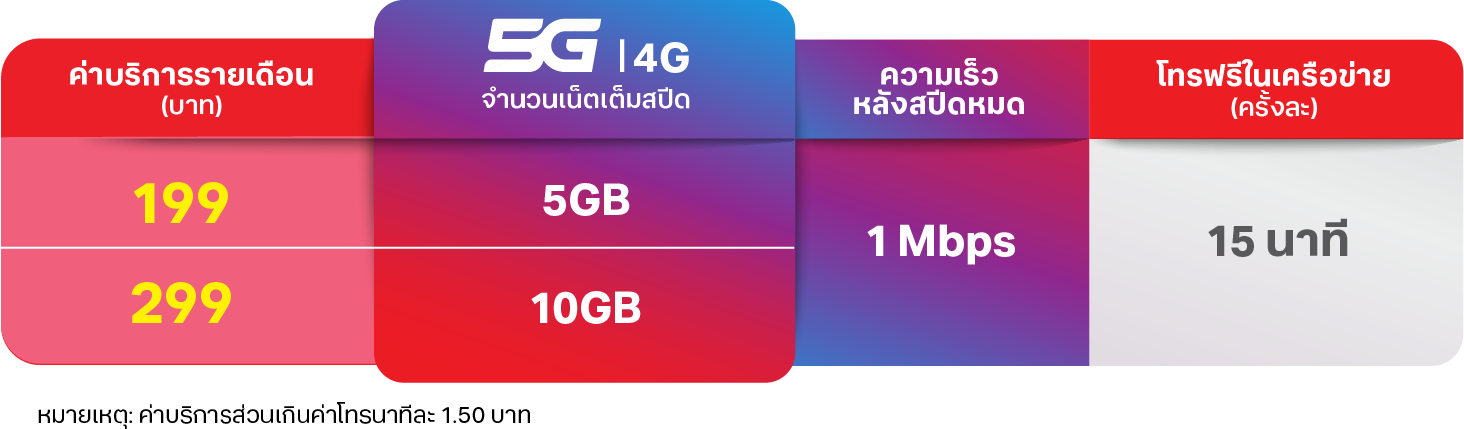
THB199/month includes 5GB and 15 minutes; THB299 includes 10GB and 15 minutes. Both require a new/ported postpaid line and Watch from AIS or participating stores. VAT is extra.
Bring-your-own-Watch: THB249/month excluding VAT, with 100 minutes.
After the allowance: 1Mbps on THB199/299 or 128kbps on THB249. Excess calls cost THB1.50/minute; SMS costs THB2.50, excluding VAT. No international roaming.
Use Set Up for a Family Member in the iPhone Watch app, then Set Up Cellular. Enter a Thai ID or passport number; the carrier checks plan eligibility before displaying charges for acceptance.
After accepting the terms, enter the iPhone SIM name and the phone number used for pairing to finish the carrier setup.
A data plan is required. 5G depends on the Watch, local network and plan, not just a carrier listing.
Plan details and conditions
Family Number’s VAT treatment, off-network/SMS allowances and adult-line minimum. The page’s THB399 adult-line requirement is explicitly for One Number, so we have not applied it to the child service.
e& confirms Family Setup with an independent number for existing active prepaid or postpaid customers. Activation finishes in-store with the account holder’s Emirates ID. Its family-watch tariff and allowances are not published on the reviewed setup page.
e&Listed by AppleView plan and setup detailsClose carrier details
e&: what we found
Plan
Apple Watch For Your Kids (Family Setup) gives the Watch an independent mobile number.
The offer is available to existing active e& prepaid and postpaid customers.
The adult and child need separate Apple Accounts in the same Family Sharing group. The adult must be the organiser or a parent/guardian, with two-factor authentication enabled.
e& lists cellular Series 4 or later and cellular SE, with watchOS 7 or later. Its baseline managing-phone requirement is iPhone 6s with iOS 14; newer Watches can require newer devices and software.
A data plan is required. 5G depends on the Watch, local network and plan, not just a carrier listing.
Plan details and conditions
The family-watch monthly tariff, allowances, activation charge and cancellation terms are not stated on the carrier’s Family Setup page. Adult MultiSIM pricing is not a verified substitute.
EE’s Standalone Family Watch plan requires an eligible EE parent phone line. BetterRoaming allows another carrier’s unlocked managing iPhone. Compare monthly or annual billing, trial terms and cancellation before choosing.
BetterRoamingListed by AppleView plan and setup detailsClose carrier details
BetterRoaming: what we found
Plan
Apple Watch For Your Kids: a standalone Watch eSIM with its own phone number.
Set up the Watch for a family member, then choose your country and monthly or yearly plan. Create or sign in to a BetterRoaming account and enter the Watch EID from Watch > General > About.
Accept the add-plan notification on the managing iPhone. If it does not arrive, open Watch > Set Up Cellular > Install Data Plan. The installed network is named 1GLOBAL.
Applicable sales taxes included. International roaming and sending or receiving international calls and SMS are not supported.[1]
Eligible first-time users get a 7-day trial. Payment details are required and billing starts afterwards unless auto-renewal is turned off.[2]
Cancel auto-renewal in the online account. Service continues to the end of the paid period. Unused prepaid service is generally not refunded, subject to the terms and consumer rights.[1]
Apple lists a family-watch option even when your iPhone carrier does not support Family Setup. Provider-specific eligibility and any unresolved conditions are recorded in this listing.
A carrier-locked parent iPhone may need unlocking before this provider can activate the Watch plan. Check before paying.
An eligible EE pay-monthly or SIM-only phone line and compatible iPhone are required for setup. A credit check applies. If you later cancel the phone line, the family Watch can continue, but resetting or reactivating it needs an eligible EE phone line again.
After signup, EE downloads the eSIM to the Watch. For customers new to EE, its terms allow up to four hours, or up to 24 hours in some cases, for activation.
giffgaffNot compatible with Family SetupView findings and alternativesClose carrier details
giffgaff: what we found
giffgaff’s eSIM support does not yet include smartwatches. giffgaff says the additional network components required for smartwatches are not yet ready. Phone eSIM support is therefore not evidence that it can activate either a companion or family-managed Apple Watch.
Reviewed . This finding applies to the documented service, not every possible future offer.
O2Not compatible: phone-linked planView findings and alternativesClose carrier details
O2: what we found
The published plan is linked to an O2 Pay Monthly iPhone. O2’s guide requires a paired iPhone with an eligible O2 Pay Monthly airtime plan. The Watch shares its minutes and texts, and cancelling the phone airtime also cancels the Watch airtime. The reviewed guide does not document separate family-member service.
Reviewed . This finding applies to the documented service, not every possible future offer.
ThreeNot compatible: phone-linked planView findings and alternativesClose carrier details
Three: what we found
Smartwatch Pairing shares the phone plan’s allowances. Three documents Smartwatch Pairing for an eligible Pay Monthly phone customer, with shared calls, texts and data. Activation uses the paired Watch in the iPhone’s My Watch tab. The reviewed plan is not a confirmed Family Setup service.
Reviewed . This finding applies to the documented service, not every possible future offer.
VodafoneNot compatible: phone-linked planView findings and alternativesClose carrier details
Vodafone: what we found
The UK Connectivity Plan shares the phone’s number. Vodafone UK’s Connectivity Plan, also called OneNumber, shares an eligible Vodafone Pay Monthly phone’s number, allowances and contacts with the Watch. The reviewed offer does not establish a separate family-managed Watch line. Vodafone’s services in other countries have different rules.
Reviewed . This finding applies to the documented service, not every possible future offer.
Nine providers appear in Apple’s family-watch list. US Mobile is separately confirmed by its own family-watch instructions. Standalone service, required parent phone lines, taxes and activation charges differ. The cards distinguish the two source types and flag unpublished child-plan terms.
AT&TListed by AppleView plan and setup detailsClose carrier details
AT&T: what we found
Plan
Family Setup gives the Watch its own number, voicemail and messages. Calls to the child do not also ring the parent’s iPhone.
Unlimited Your Way Apple Wearables is US$10.99/month with a qualifying phone line. The terms price the first standalone non-phone device at US$75.99/month without one. Taxes and fees are extra.
A data plan is required. 5G depends on the Watch, local network and plan, not just a carrier listing.
Apple lists a family-watch option even when your iPhone carrier does not support Family Setup. Provider-specific eligibility and any unresolved conditions are recorded in this listing.
Set up the Watch for a family member, then choose your country and monthly or yearly plan. Create or sign in to a BetterRoaming account and enter the Watch EID from Watch > General > About.
Accept the add-plan notification on the managing iPhone. If it does not arrive, open Watch > Set Up Cellular > Install Data Plan. The installed network is named 1GLOBAL.
Applicable sales taxes included. International roaming and sending or receiving international calls and SMS are not supported.[1]
Eligible first-time users get a 7-day trial. Payment details are required and billing starts afterwards unless auto-renewal is turned off.[2]
Cancel auto-renewal in the online account. Service continues to the end of the paid period. Unused prepaid service is generally not refunded, subject to the terms and consumer rights.[1]
Apple lists a family-watch option even when your iPhone carrier does not support Family Setup. Provider-specific eligibility and any unresolved conditions are recorded in this listing.
A carrier-locked parent iPhone may need unlocking before this provider can activate the Watch plan. Check before paying.
In the Boost app, open Settings, Device Setup, Activate and select the managing iPhone. On the website, use Activate, then Device Setup. Finish in Apple’s Watch app with Set Up for a Family Member.
Adding a Watch moves a No Contract phone account to Boost’s Buy Now, Pay Later billing arrangement. AutoPay is required and the monthly bill is due 15 days after the cycle begins.
C SpireListed by AppleView plan and setup detailsClose carrier details
C Spire: what we found
Plan
Connect & Protect Wearable is the standalone Apple Watch plan, with its own phone number. Wearable Share is the different, phone-number-sharing product.
Choose Set Up for a Family Member and skip the first cellular step. Afterwards open Cellular, Set Up Cellular, sign in as the account holder, select Standalone Wearable and enter the 911 address before submitting.
Cellcom’s eligibility FAQ requires a Cellcom iPhone and an eligible plan. Listed options include Unlimited, Share, Advantage and Prepaid Unlimited plans.
After family setup, open Cellular, Set Up Cellular and sign in to myCellcom. Choose Activate a new watch, review the monthly and activation charges, accept the terms and submit the plan.
This carrier does not support UMTS (3G) for Apple Watch. Check its Watch coverage where your child will use it.
Plan details and conditions
The reviewed family-watch guide shows charges during activation but does not publish one exact Family Setup monthly price, data allowance or activation amount.
Add the child’s Apple Account to Family Sharing, choose Set Up for a Family Member in the Watch app, then Set Up Cellular. Pay for the Watch line and confirm the emergency 911 address.
The first Watch payment is the full US$10 even if you activate partway through the phone billing cycle. A prorated adjustment is applied on the next payment cycle.
Apple lists a family-watch option even when your iPhone carrier does not support Family Setup. Provider-specific eligibility and any unresolved conditions are recorded in this listing.
Published Watch Plan 2.0 pricing starts at US$10/month with eligible AutoPay, plus taxes and fees. The page does not identify a separate Family Setup tariff.
Use a compatible cellular Watch, add the child to Family Sharing, then pair it to the parent’s iPhone as a family member, not as the parent’s own Watch.
Postpaid 2.0 plans have a US$35 device connection charge. The AutoPay discount requires a bank account or debit card; other payment methods add US$5 per line each month. Published regulatory and carrier-recovery fees total up to US$5.49 per line, with government surcharges added separately.
A data plan is required. 5G depends on the Watch, local network and plan, not just a carrier listing.
Apple lists a family-watch option even when your iPhone carrier does not support Family Setup. Provider-specific eligibility and any unresolved conditions are recorded in this listing.
Plan details and conditions
The reviewed pages do not establish which current 2.0 tariff is provisioned for Family Setup, or its price without a qualifying adult T-Mobile phone line.
US MobileProvider-confirmed Family SetupView plan and setup detailsClose carrier details
US Mobile: what we found
Plan
Standalone mode is for family members without their own iPhone, with a separate number on Warp. Companion mode shares the adult’s number. The free Watch add-on with Unlimited Premium is companion-only.
The managing iPhone does not need an active US Mobile line. You need separate Apple Accounts, two-factor authentication and a Family Sharing group containing the Watch user, with the adult as organiser or parent/guardian.
Buy the standalone plan in the US Mobile dashboard, enter the Watch IMEI and choose a new or transferred number. Finish cellular installation through the family member’s Watch in the iPhone Watch app. US Mobile’s guide instructs temporarily disabling the iPhone’s SIMs to avoid another carrier blocking setup.
Cellular Watch compatibility still applies. US Mobile says 5G-capable Watches currently connect over LTE only. Its support guide warns that Visual Voicemail does not work in standalone mode on 5G Apple Watches.
US Mobile’s standalone Apple Watch plan is explicitly for family members without their own iPhone. It uses Warp and gives the Watch its own number.
The managing iPhone does not need a US Mobile phone line. A compatible iPhone, separate Apple Accounts and Family Sharing are still required.
Plan details and conditions
US Mobile’s Broadband Facts page has a US$10 standalone heading but a US$9.50 monthly label. The monthly amount above follows the label; the annual product offer separately confirms US$78.
The managing iPhone can use another carrier. If the Watch is not already activated, Verizon’s family setup guide requires Verizon-assisted activation before continuing cellular setup.
A data plan is required. 5G depends on the Watch, local network and plan, not just a carrier listing.
Apple lists a family-watch option even when your iPhone carrier does not support Family Setup. Provider-specific eligibility and any unresolved conditions are recorded in this listing.
US$10/month per Watch. With a Mobile Select or Mobile Plus phone line, the All-in credit caps eligible tablet/watch service at US$35/month plus taxes and fees, for up to ten lines.
An active Xfinity Mobile phone line is needed to activate. Afterwards the Watch may remain as the only line. Adding another Watch requires a phone line again. NOW Mobile is excluded.
Order the standalone option for a new number, then set up for a family member. The order and activation modes must match. The assigned Watch number cannot be ported in or out.
Standalone setup requires iPhone 11 or later with iOS 26.1 or later. Xfinity lists Series 9+, Ultra 2+ and SE 2+ bought from Xfinity; other watches need its compatibility check.
Metro by T-MobileNot compatible with Family SetupView findings and alternativesClose carrier details
Metro by T-Mobile: what we found
Metro explicitly excludes Set Up for a Family Member. Metro’s Apple Watch instructions require Set Up for Myself. They explicitly warn that Set Up for a Family Member is unavailable and prevents the Watch connecting to Metro. T-Mobile’s separate family-watch offering does not establish Metro support.
Reviewed . This finding applies to the documented service, not every possible future offer.
Nex-Tech WirelessFamily Setup unconfirmedView findings and alternativesClose carrier details
Nex-Tech Wireless: what we found
Apple Watch service is advertised, but family activation is unverified. Nex-Tech’s public Watch support page links to general Apple setup and cellular help. We could not verify a family-managed standalone activation route from the reviewed provider pages. Nex-Tech is not included as a confirmed Family Setup option.
Reviewed . This finding applies to the documented service, not every possible future offer.
PureTalkNot compatible: phone-linked planView findings and alternativesClose carrier details
PureTalk: what we found
The activation route uses Set Up for Myself. PureTalk uses the word standalone for a Watch that works away from its phone, but its instructions require an active PureTalk iPhone and Set Up for Myself. Generic Family Setup features in its hardware descriptions do not confirm a family-managed cellular plan.
Reviewed . This finding applies to the documented service, not every possible future offer.
RedPocketNot compatible: phone-linked planView findings and alternativesClose carrier details
RedPocket: what we found
The Watch add-on pairs with an existing GSMA phone line. RedPocket’s Apple Watch support describes an add-on for an existing GSMA phone line. Its pairing instructions use Set Up for Myself. The reviewed guide does not establish separate family-member activation for a child without an iPhone.
Reviewed . This finding applies to the documented service, not every possible future offer.
VisibleNot compatible: phone-linked planView findings and alternativesClose carrier details
Visible: what we found
Visible’s Watch service shares the iPhone’s number. Visible requires an iPhone with active Visible service and says the Watch shares that iPhone’s number. This documents companion service, not a separate child’s line activated through Family Setup.
Reviewed . This finding applies to the documented service, not every possible future offer.
Apple’s current family-feature list names 21 countries and regions. Its separate family-watch carrier list names 25. Neither confirms OkayTu app availability.
We keep those Apple source lists intact. The directory adds providers only when their own current documentation explicitly supports a family-managed Watch for someone without their own iPhone. US Mobile and Hay Communications are provider-confirmed additions, not Apple-listed entries. A generic eSIM, number-sharing plan or Apple Watch sales page is not enough.
Family-feature regions: Australia, Bahrain, Canada, France, Germany, Hong Kong, India, Japan, Kuwait, Macao, Norway, Poland, Singapore, Spain, Sweden, Switzerland, Taiwan, Thailand, United Arab Emirates, United Kingdom, United States.
Finland, the Netherlands, Puerto Rico and Qatar have carrier entries but are not separately named in the current feature list. That omission is not evidence that family-watch setup is unavailable. Telia publishes Finland’s child-Watch setup, BetterRoaming sells Netherlands family-watch plans, and Ooredoo publishes Qatar’s plan and activation steps. We use those direct sources to answer the availability question.
Apple lists Liberty for family-watch service in Puerto Rico. Our review of Liberty’s mobile-plan and roaming pages separates its phone offers from Watch service. Those pages do not itemise a Family Setup tariff or account requirements, so the directory does not present phone-plan prices as Watch prices.
Both checked 11 October 2026. This is a reviewed reference, not a live carrier feed. Plans, models and account requirements can change.
Can an independent eSIM provider fill the gap?
We checked this too. Phone travel eSIM coverage is not the same as Apple Watch Family Setup activation.
BetterRoaming: eight supported Watch markets
Its own Watch coverage page lists Australia, France, Germany, the Netherlands, Poland, Spain, the UK and the US. Ireland, New Zealand, Mexico, Italy and China mainland are not offered. The Watch can connect only in the country chosen at purchase, so buying a UK plan is not an Irish workaround.
Ubigi explicitly says its eSIM cannot be installed directly on Apple Watch. Its phone travel coverage does not provide an alternative child-Watch activation route.
Checked 11 October 2026. These are provider-published findings, not activation tests or an exhaustive list of every eSIM seller.
Country not listed?
An omission from Apple’s table is not our conclusion. We reviewed local provider plans and activation instructions in Ireland, New Zealand, Mexico, Italy and China mainland, with the findings above. This is not yet a carrier-by-carrier survey of every unlisted country. Wi-Fi is not a workaround for unavailable regional Family Setup, and an adult number-sharing plan is a different product.
Travelling or moving? Family-managed Apple Watches do not support international roaming. Read our travel and moving-country guide before relying on a connection away from home.
The parent essentials
Family-watch plan questions, answered.
Can any cellular Watch plan work for a child?
No. A family-managed Watch needs a plan supporting Apple Watch For Your Kids (Family Setup). An ordinary adult Watch plan often shares the iPhone’s number and is not the same setup. The directory separates family-watch listings from those ordinary plans.
Not necessarily. A family-managed Watch can use a different supported carrier. Individual providers can still require an adult account, a compatible regional Watch or an unlocked managing iPhone. Open the carrier’s details for the researched conditions.
Apple says a cellular plan is not required for initial family setup, but some features need one. Away from usable Wi-Fi, your child needs compatible cellular service and coverage for an internet connection. Wi-Fi does not bypass regional or device requirements.
No. OkayTu is available on the App Store in supported countries and regions. Carrier activation and app compatibility are separate. Read the OkayTu setup requirements before buying hardware specifically for the app.
OkayTu starts with Apple’s dedicated family-watch carrier table, then checks the separate regional feature list and carrier-published plan information. We record country-specific restrictions and keep conflicting guidance visible. This is an editorial reference, not a live carrier feed or a claim that we have activated every plan.
We also research providers beyond Apple’s table, including local carriers in regions Apple does not list. A provider-confirmed addition needs explicit documentation for a family-managed Apple Watch whose wearer has no iPhone, with an identifiable service and activation route. US Mobile and Hay Communications meet that test. Their cards link to provider evidence and do not imply Apple approval.
A region missing from Apple’s general feature page is not treated as unavailable when the dedicated family-watch table and a carrier’s local setup instructions confirm service. We show the researched answer first and explain source differences below. Unpublished prices or account conditions stay explicitly unconfirmed, rather than becoming a blanket warning about the country.
Each carrier record includes its sources and review date. A country/carrier pair is one listing, so a provider operating in several countries appears more than once. Countries are alphabetical, with family-watch listings before other researched plans. This is not a ranking of coverage, quality or value. Published terms can change, and a personal account check may still be needed at checkout.
Prices use the provider’s local currency and published conditions. We do not convert an overseas offer into a supposed local price. Where the public source does not answer a point, we say what remains unconfirmed.
All researched carriers appear together. Red “Not compatible with Family Setup” tags identify providers that explicitly exclude that setup. Red “Not compatible: phone-linked plan” tags apply to the documented number-sharing offer, not every service the provider may sell. Amber “Family Setup unconfirmed” tags mean the reviewed evidence does not establish an eligible plan. These cards are searchable but excluded from the supported listing count and structured carrier list.
Allow Google Analytics to measure visits on this website? This does not enable session recordings. Choose settings to manage visit analytics and recordings separately. Your choice does not affect the app.